


A fan has the main match on the television, an alternate camera on a tablet, commentary on a phone, and scores in a companion app. The goal arrives on the tablet first. The score changes next. The television catches up last. Every service in that chain can accurately describe itself as live.
That is why multiview sports streaming synchronization needs a product decision before it becomes a player setting. A single end-to-end latency number cannot describe whether the audience experience works. The meaningful question is which views, audio tracks, data signals, and notifications a viewer expects to agree with each other, and what happens when one of them stalls or switches bitrate.
Apple's multiview guidance makes the distinction plainly: different camera angles of the same sports event should be coordinated so important moments line up; streams of unrelated events do not need to be synchronized with each other. The August 2026 Streaming Media discussion that included Roku and SVT Play reached the same practical conclusion from the service side. Tight alignment matters in particular experiences. It is not a universal virtue. Apple Developer, Streaming Media
For product leaders preparing a multiview offer around IBC, this is the useful unit of work: write a synchronization contract for every audience experience, then test it on the devices that will carry it.
Why is one multiview latency number the wrong target?
Latency measures the distance from an event to a particular playback device. Synchronization measures the difference between two experiences the same viewer compares. Those are related, but they are not interchangeable.
A player can run close to the live edge and still be visibly out of step with another player. It can also run several seconds behind the venue while staying acceptably aligned with the selected audio and the other angles in the same application. An executive dashboard that reports one average live delay can therefore miss the failure that the viewer actually sees.
The delivery stack makes variation normal. In a live DASH presentation, the media timeline is mapped to wall-clock time, while the client can choose a time shift behind that live point. DASH-IF also warns that different client algorithms can choose different presentation delays. For HLS low-latency delivery, the current Internet-Draft uses program-date-time tags to map segments more precisely across renditions, while explicitly saying that client and server real-time clocks do not have to be synchronized. DASH-IF Timing Model, IETF HLS 2nd Edition draft
That is the engineering reason to avoid a universal promise. Devices may begin at different positions, recover differently after a stall, choose different adaptive-bitrate paths, or receive a late notification from a separate service. The customer-facing requirement needs to say which comparison is important.
Which sports experiences require tight synchronization?
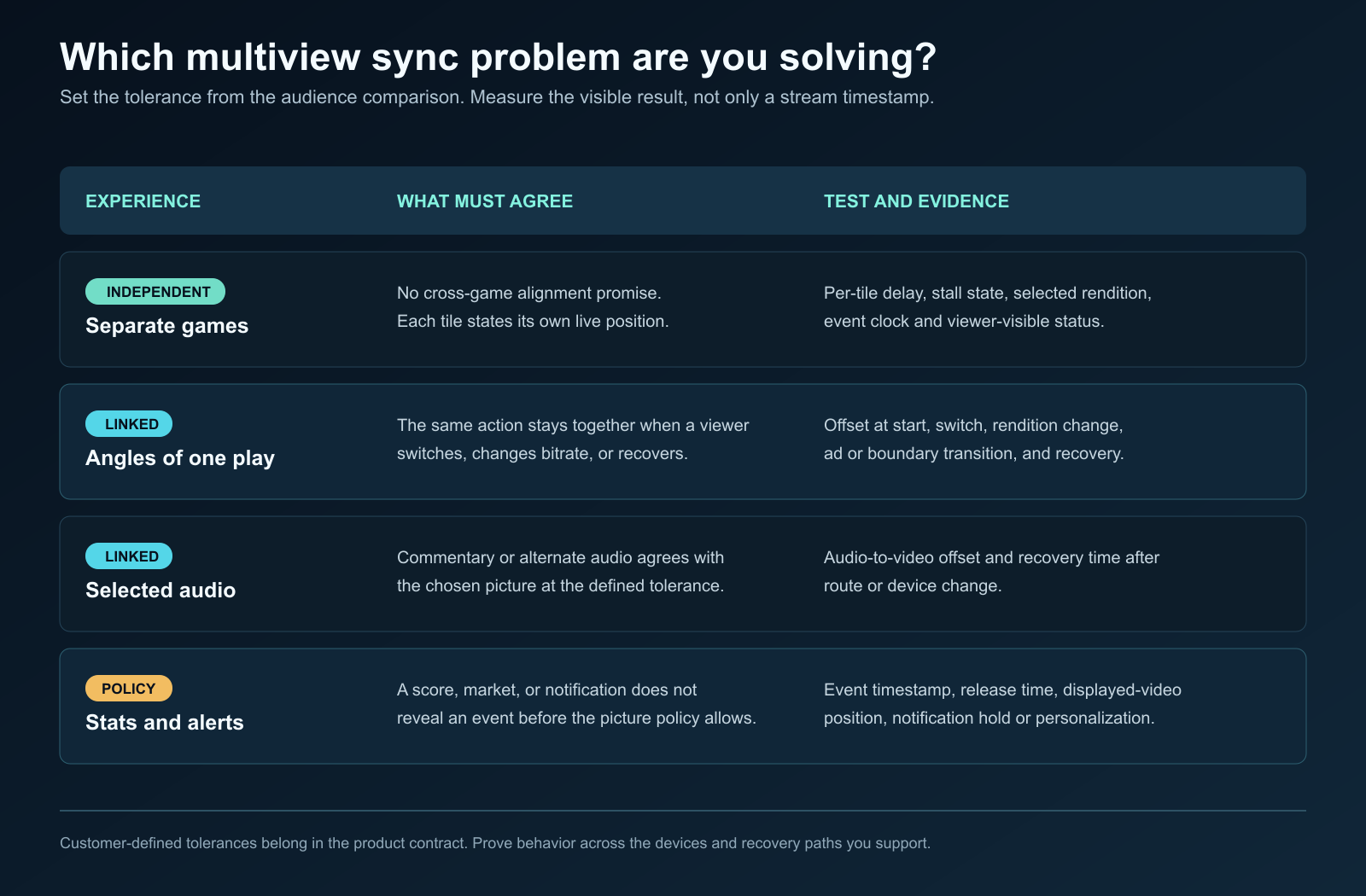
The table below is a starting point for a product team. The target is deliberately described as an audience outcome rather than a copied number. A league, rights holder, and product owner should set the actual tolerance, in frames or milliseconds, after testing the sports, devices, and revenue use cases they operate.
Audience experience | What the viewer compares | Synchronization contract to define | Evidence to capture |
|---|---|---|---|
Independent games | Separate events in a mosaic | No cross-game alignment promise. Each tile should be truthful about its own live position. | Per-tile delay, stall state, selected rendition, event clock. |
Multiple angles of one play | The same action from two cameras | The play should line up through selection and return from a stall. Set a customer-defined visual tolerance. | Offset at start, after angle switch, after bitrate change, after recovery. |
Selected audio on another device | Commentary, radio feed, accessibility audio, or alternate language against a chosen video | Audio must remain within the product's customer-defined lip-sync or event-cue tolerance for that selected picture. | Audio-to-video offset and recovery time after route or device change. |
Scores, odds, and companion data | A score update or market state against visible play | Data must not reveal an outcome before the corresponding picture under the chosen policy. | Event timestamp, data release time, displayed-video position. |
Push notifications | A goal, replay, or breaking-event alert against what is on screen | Notifications must be held or personalized so they do not spoil the viewer's current stream. | Notification release time, viewer playback position, opt-out behavior. |
The important difference is intent. An Olympic mosaic with swimming and athletics can tolerate separate clocks because the viewer is comparing two independent events. An end-zone angle and the main game feed cannot, because a viewer expects the same tackle to happen together. Apple uses those same two categories in its developer material. Apple Developer
What should a multiview synchronization contract contain?
A useful contract has five fields. It should be written before engineering chooses a coordination mechanism or a commercial team promises a latency number.
- Comparison pair. Name the two things that must agree: main video and coach cam, video and Spanish audio, picture and score, or picture and alert.
- Viewer consequence. State the failure in plain language. “The replay reveals the goal before the main feed” is actionable. “Low sync quality” is not.
- Customer-defined tolerance. Set the permitted difference in frames or time for that pair. Do not reuse the selected-audio tolerance for independent games.
- Recovery rule. Say what happens after a stall, ad transition, device wake, route change, or quality switch. Does the experience pause linked views, catch one view up, identify the lagging view, or permit them to diverge?
- Measurement point and owner. Identify where the comparison is measured and who responds. A packager can prove timestamp alignment. An application can prove coordination inside its player environment. A separate phone and connected television may only be measurable through instrumented clients and test fixtures.
This approach gives operations a real acceptance test. It also avoids an expensive misunderstanding during a proof of concept, where one team has validated stream timestamps while another assumed a promise about every unmanaged consumer device.
How do separate player clocks become visible drift?
Separate players are independent control systems until an application or service explicitly coordinates them. Each one has its own buffer, adaptive-bitrate decisions, current presentation time, and response to network loss. Starting two views from a common program timestamp helps. It does not guarantee that they stay together.
For dynamic DASH, clock synchronization matters because client decisions map the media timeline to a shared wall clock. The dash.js documentation says it synchronizes the clock at playback start and after MPD updates. Its live-streaming guidance also shows the principle for multiple players: use the same configured live delay and enable catch-up so the players run at roughly the same position. “Roughly” is the honest word here. The target must still be tested under the paths your viewers take. dash.js clock synchronization, dash.js live streaming
At the packaging layer, alignment is still essential. DASH-IF says gradual desynchronization across tracks is a sign of clock drift and says a service must not publish content suffering from that drift, because typical clients lack the means to compensate through timeline stretching. That gives the engineering team a clean separation of responsibilities: first prove media-time alignment; then prove the audience experience on the actual player and device combinations. DASH-IF Timing Model
The application layer can add coordination where its platform permits it. Apple's WWDC25 example describes a coordination medium that propagates state such as playback rate and time among connected players for a multiview experience. It is a platform-specific example, not evidence that every connected-TV, browser, and mobile player can share a clock in the same way. Apple Developer
What should you measure during switching and recovery?
Measure the moments when the audience stops seeing a clean demo. Startup alone is insufficient.
Build a test run around a known visual and audible event, then record the position of every view before and after each disruption. DASH-IF's Live Simulator can create wall-clock-synchronized live streams by rewriting timestamps, segment numbers, and URLs, which makes it a useful public fixture for part of this work. It does not replace tests against the real workflow, ads, rights variants, and device fleet. DASH-IF Live Simulator
Test at least these paths:
- Start the main view, then add the second angle after the event is already under way.
- Switch the focused tile repeatedly while the network is clean and while one view changes rendition.
- Interrupt one view with constrained bandwidth or a short loss period, then observe the recovery behavior.
- Cross an ad break, program boundary, or manifest update where available.
- Change the selected audio and test the return from a Bluetooth, AirPlay, cast, or accessibility route transition where the product supports it.
- Trigger a score update and notification against viewers deliberately positioned at different playback delays.
The resulting report should show a distribution, not a single best result. Break it out by device family, application version, network condition, stream type, and transition. SVT Play's public technical explanation offers a useful reminder of why: its live service uses HLS CMAF and MPEG-DASH with adaptive streaming, while video and audio adapt to the network and device. SVT Play technical quality
This is also where media evidence belongs. An observability workflow can retain output-level proof of what each delivered feed contained and when it was observed. Amira Labs can help teams reason from that evidence across delivery outputs. It should not be represented as a controller for every consumer player's clock.
Where does a sync-everything strategy stop working?
It stops at the boundary between controlled playback and an audience's independent devices. A broadcaster can align source clocks, packaging timelines, and players within a supported application. It cannot honestly guarantee that a television on one home network, a phone on another network, a third-party platform, and a separate notification service will always present the same instant.
There is a second limit: tight coordination has a cost. Catch-up behavior, buffering policy, aggressive live-edge targets, and extra telemetry can each affect startup, playback stability, or data use. A product with independent simultaneous games may deliver more value by showing each tile's state clearly than by making the mosaic wait for a slowest member. A commentary companion experience may need a stricter promise than a four-game scoreboard. The product contract should make those tradeoffs visible.
The September 2026 IBC technical programme includes a session on XR and multiview developments, including a paper titled “Implementing a single-player multiview solution.” That is a good signal of where implementation attention is going. It is not a reason to assume a single architecture is suitable for every distribution endpoint. IBC 2026 technical papers
What should you ask multiview vendors at IBC?
Ask for a test answer rather than a slide answer.
- Which view pairs does your synchronization claim cover, and which pairs are intentionally independent?
- Where is the offset measured: encoded media, packager output, player clock, or a rendered device?
- What does the product do after one view stalls, changes bitrate, crosses an ad transition, or resumes from background?
- Can the team show offset distributions by device family and software version, rather than a single lab result?
- How are score feeds and notifications prevented from getting ahead of a viewer who is behind the live edge?
- What evidence can operations retain when a viewer says a feed spoiled the game or the selected commentary was wrong?
Those questions are useful even if a vendor's answer is “we do not control that endpoint.” Scope is a product fact. It should be named early.
What can your team do this week?
Choose one upcoming sports experience and write the five-field contract for every comparison a viewer can make. Then select one controlled device pair and one uncontrolled cross-device pair. Run the same event-marker test through startup, a switch, and a recovery. Keep the offsets, the playback states, and the release time of any score or alert.
You will learn more from that small matrix than from a generic promise of low latency. It turns multiview sports streaming synchronization into a requirement the product, player, distribution, and operations teams can share.
For the related distribution question, see Amira Labs' guide to live vertical sports video quality control. The sport may be different. The discipline is the same: define the viewer-visible failure, observe the output, and preserve evidence before it becomes a support dispute.
Sources
- Apple Developer, “Create a multiview playback experience,” WWDC25, accessed September 5, 2026.
- DASH-IF, DASH-IF Timing Model, accessed September 5, 2026.
- dash.js, Clock Synchronization documentation, accessed September 5, 2026.
- dash.js, Live Streaming documentation, accessed September 5, 2026.
- IETF, HTTP Live Streaming 2nd Edition Internet-Draft, January 2026.
- DASH-IF, Live Simulator, accessed September 5, 2026.
- SVT Play, audio and picture quality, accessed September 5, 2026.
- Streaming Media, “Frame-Accurate Sync and Multiscreen Streaming Experiences”, August 25, 2026.
- IBC 2026, XR and Multiview Developments, accessed September 5, 2026.