
Dek: Avid's new AI extension preserves originals and lets editors choose results, but facilities still need a release process that distinguishes generated material from approved source footage.
On November 10, 2026, Avid launched Ready to Play, an optional Media Composer extension developed with Google's AI models. Its initial workflows generate video, modify a selected clip or analyze footage to add descriptions to metadata. The announcement makes a useful distinction: new clips are created separately rather than overwriting source media, and editorial decisions remain with the editor.
That is not the same as saying a program master is safe by default. Once a generated clip appears beside acquired footage in an edit bin, it can be reviewed, duplicated, conformed or exported through the same downstream workflows. The risk is misclassification at a handoff, not an announced feature that automatically publishes generated media.
What Avid actually shipped
Avid's product page describes an extension that uses a customer's Google account and cloud project for the AI services. The November 10 FAQ lists Media Composer Ultimate and Enterprise 2026.8 or later, not Standard or First. Eligible users pay no added Avid license fee for the extension; applicable Google AI usage is billed separately.
According to that FAQ, the tool does not edit sequences automatically or run autonomously in the background. Editors choose an action and an output location. Analysis metadata can be added to a master clip, while generation and modification return separate assets. Media and prompts are processed through the customer's Google Cloud account, so the facility must consider cloud access, contracts and data handling before using confidential material.
Six acceptance checks for a postproduction facility
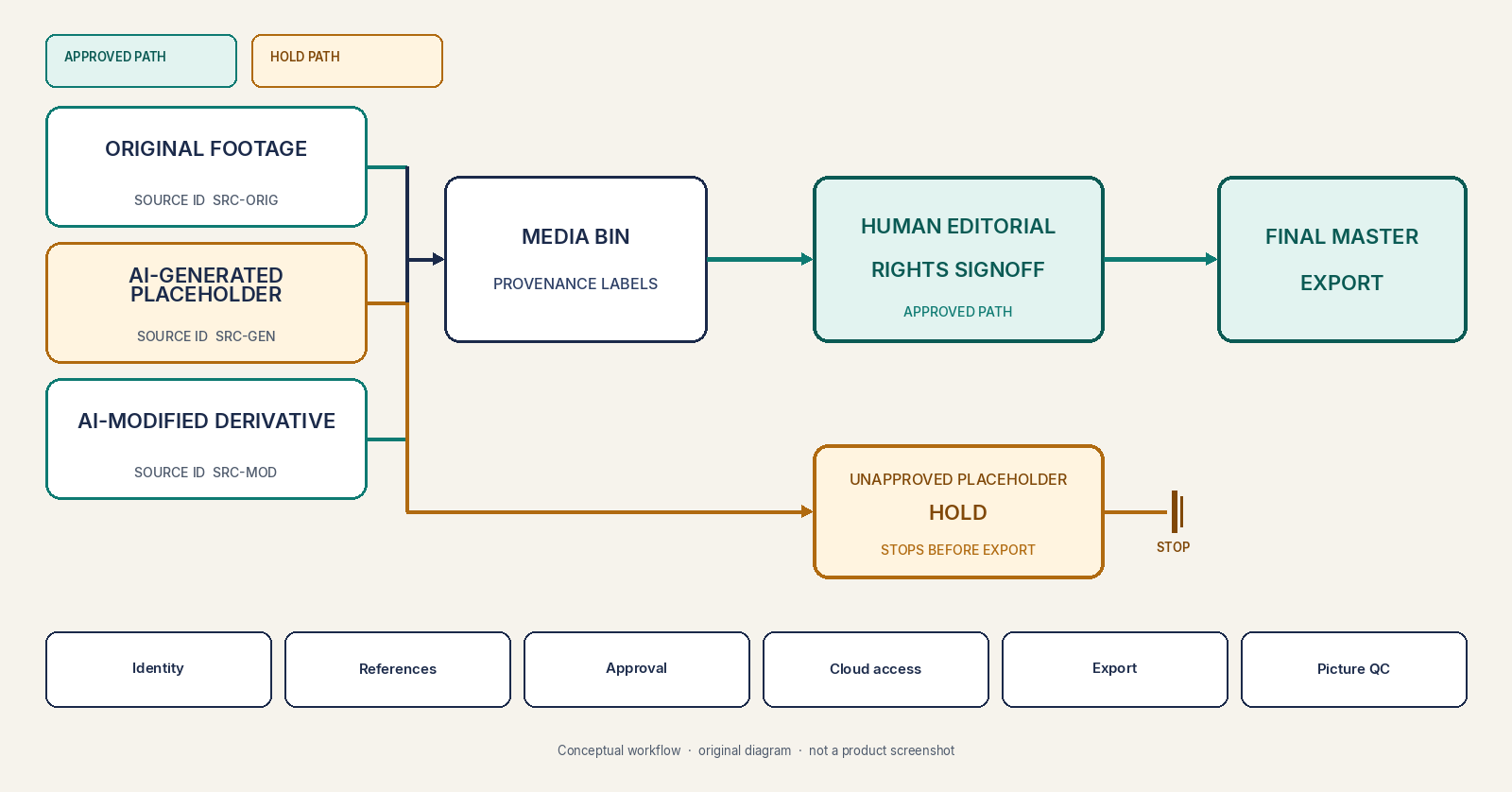
1. Label every derivative at creation. Distinguish original capture, editorial proxy, AI-generated placeholder, AI-modified shot and model-derived descriptive metadata. Keep the identifier alongside the new clip when bins, projects and interchange files move between operators. A filename alone is too easy to strip or rename.
2. Preserve the reference chain. For a modified clip, record the source asset, source time range, model or tool version where available, prompt or edit request, output and responsible operator. Verify the original can be retrieved independently after the derivative is moved or relinked. Treat the chain as production evidence, not a guarantee that content is truthful.
3. Test the approval boundary. Create a clearly marked synthetic placeholder in a test project, then attempt a normal handoff to finishing. The facility's release checklist should block that asset from a final master unless a named editor explicitly approves it, confirms its intended use and clears rights or disclosure requirements.
4. Check cloud and account permissions. The Avid workflow sends material to Google Cloud services from the workstation. Verify which projects and billing accounts are authorized, whether the requested content may be uploaded, and how service access is revoked. A test with non-sensitive footage should precede use on unreleased or contract-restricted media.
5. Inspect export and interchange behavior. Export an edit decision list or other supported interchange format, relink media in a separate finishing environment and make a test master. Check whether origin labels, approval notes and version identifiers survive. If the finishing tool discards them, establish an external manifest and reconcile it before delivery.
6. Verify the actual finished picture. A technically valid codec, loudness report and channel map cannot confirm that a generated image depicts an approved event or person. Review representative frames against editorial expectations, the original source and the delivery manifest. Require a second signoff where publication risk warrants it.
Provenance tools help, but cannot approve a story
The C2PA Content Credentials specification provides mechanisms for signed provenance assertions and asset history. It can be useful where supported, but the existence of a credential does not establish that a depicted claim is accurate or legally cleared. Nor should an organization assume Media Composer's new extension automatically creates or retains C2PA manifests without verifying it.
Avid explicitly positions Ready to Play for creative exploration and review. Its FAQ says generated or modified media may carry rights and suitability questions and leaves the final decision with the production team. That is the right boundary for a newsroom or broadcaster to test.
Start with one controlled edit containing source footage, a generated placeholder and an approved modification. Follow it through bin transfer, finishing and master export. If every person and system can identify which picture came from where, who cleared it and whether it is allowed in the master, the new capability has a defensible operating path.
Image credit: Original Amira Labs editorial diagram, November 11, 2026, to be rendered from this specification. Conceptual postproduction acceptance workflow, not an Avid screenshot or real production project.